Why Your AI Coding Agent Keeps Forgetting Things (And How Skills Fix It)
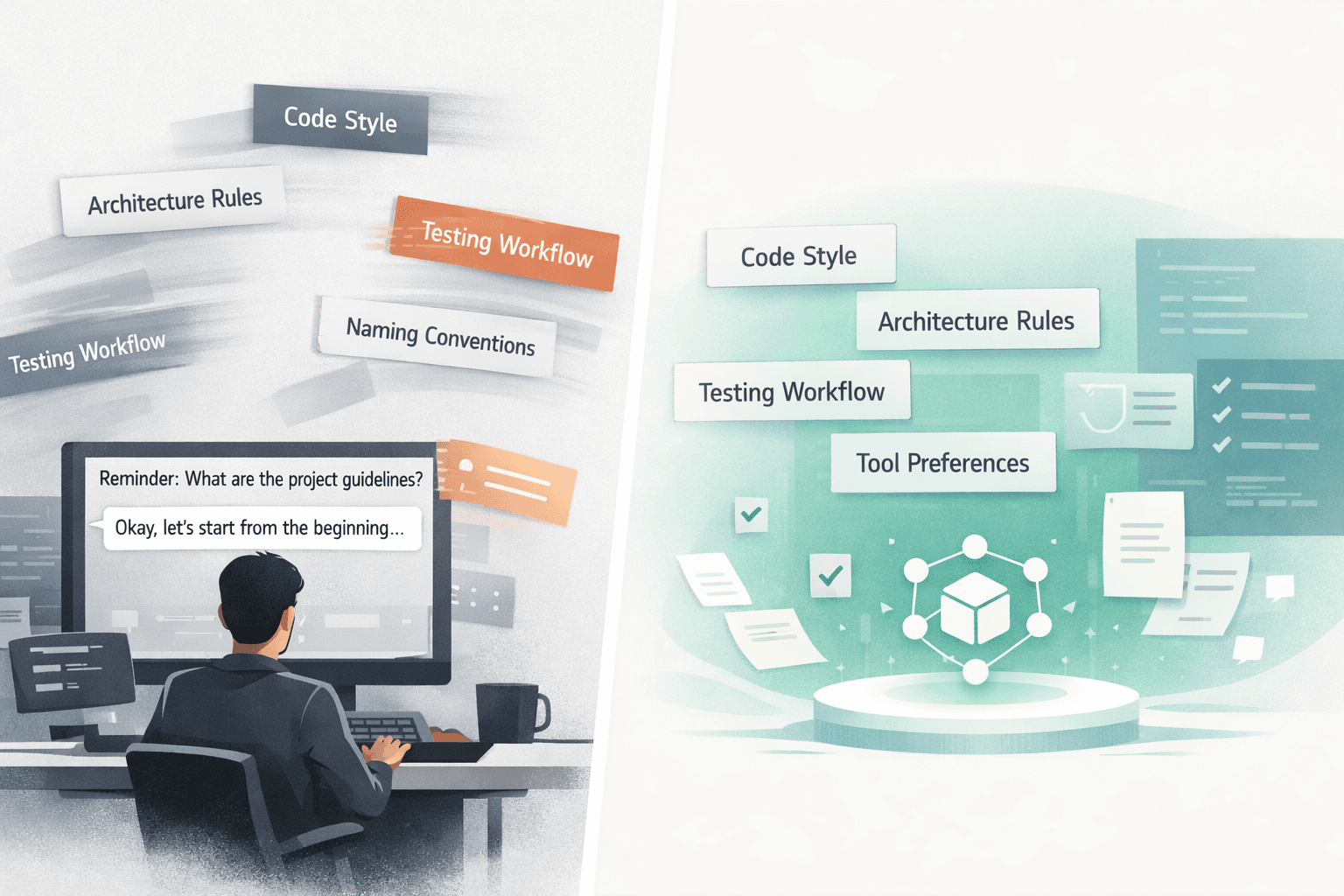
You open Cursor on Monday morning, start a fresh chat, and immediately fall back into the same ritual. React 19. pnpm, not npm. No default exports. Server actions stay thin. Shared UI lives in one package. The naming convention for components took weeks to get everyone to follow, and now you are teaching it to your agent all over again like none of that work ever happened.
You already fixed this on Friday. You probably fixed it three times last week. But a new session means your agent acts like it just landed in the repo for the first time. The stack details are gone. The architecture rules are gone. The tool preferences are gone. The hard-won project habits that make your codebase feel coherent are gone. Every. Single. Session.
That frustration is not just you, and it is not isolated to one product. It shows up as cursor agent forgetting context, weird Claude Code memory gaps, and the constant feeling that your coding agent keeps resetting halfway through real work. This is not a Claude bug or a Cursor bug. It is the default shape of the AI coding agent context problem: LLM-based agents are stateless by design, so unless you add a persistent layer yourself, your agent cannot remember what matters between sessions, projects, or teammates.
Quick Answer
- Your coding agent starts from scratch because LLM agents are stateless unless you add a reusable context layer.
- Pasted prompts,
context.md, and tool-specific system prompts help a little, then break under long chats, team drift, or tool switching. - AI agent skills give your agent repeatable instructions for how to work in your environment instead of forcing you to re-explain everything.
- Hosted MCP skills make those instructions persistent across Cursor, Claude Code, Codex, and teammate sessions.
The Real Reason Your Agent Keeps Starting From Scratch
Every new chat starts with a blank model plus whatever prompt the tool injects around your request. That means your agent is not continuing from last Monday. It is not carrying over what it learned in another repo. It is not holding onto the conventions you explained in a different window. It only knows what is in the current context window right now.
That matters because context is temporary. Early instructions compete with everything else you add to the session: file contents, terminal output, stack traces, edits, follow-up requests, and long back-and-forth debugging. Once the context window fills up, the agent has less room to keep your original rules active. This is why a session can start strong and then quietly drift into the wrong naming pattern or wrong package manager thirty minutes later.
The same repo also behaves differently for different people because the agent wrapper is not universal. One teammate has a polished system prompt in Cursor. Another has a half-finished local prompt in Claude Code. A third person uses Codex with almost no extra instruction at all. Same codebase, same task, different starting behavior.
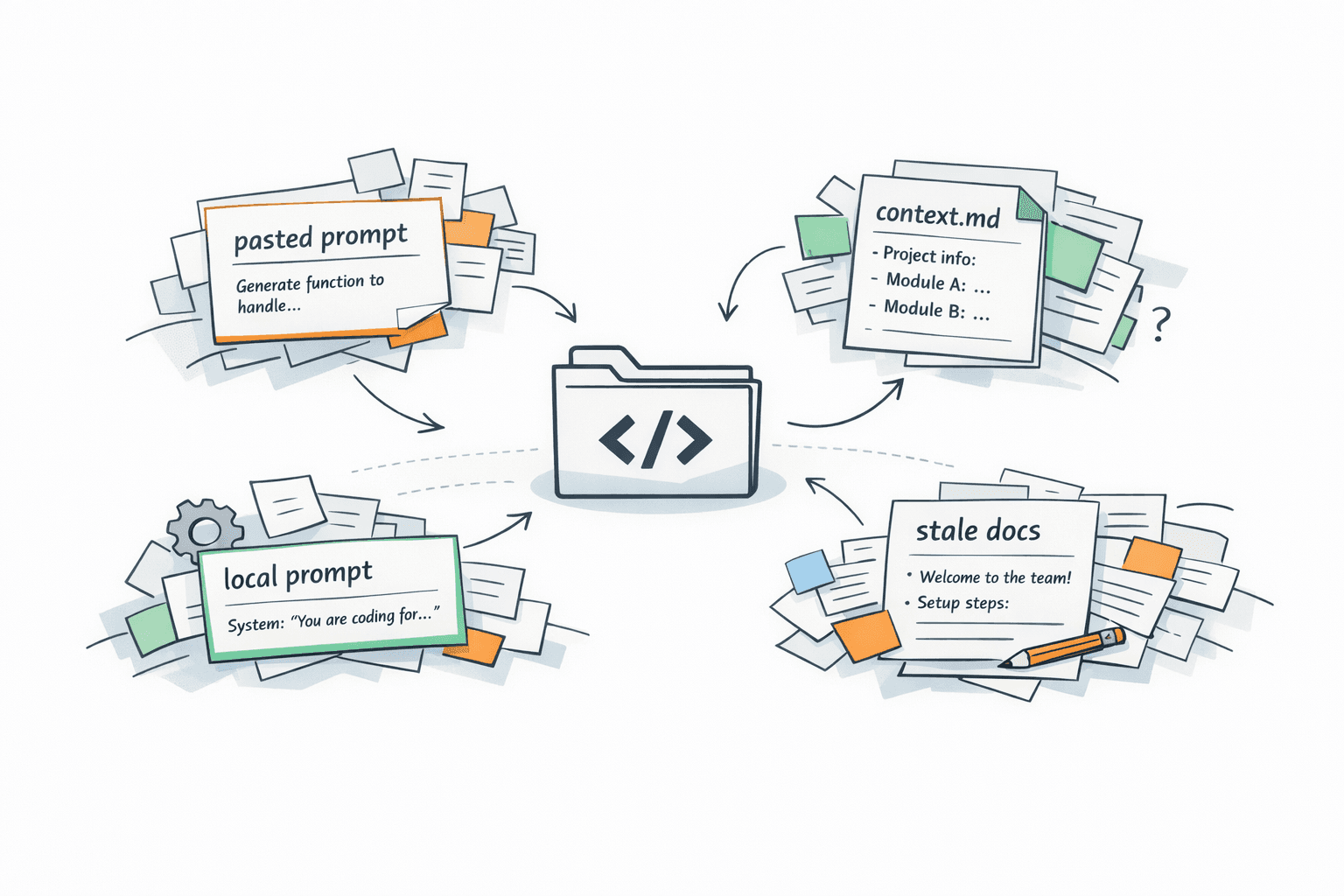
A lot of teams try to patch this with local prompt files, but that is still a machine-level fix to a systems-level problem. Those files get copied between laptops, forgotten after a refactor, forked into slightly different versions, and left to rot. The issue is not that the tools are bad. The issue is that stateless agents need a shared operating layer, and most teams do not have one.
What Developers Actually Do (And Why It Doesn't Work)
Most developers are not lazy about this. They already know the agent forgets, so they invent workarounds. The problem is that every workaround is fragile because it still depends on manual repetition or tool-local configuration.
- Pasting context at the start of every chat
- Keeping a
context.mdfile in the repo - Writing long system prompts
- Hoping the agent figures it out
Pasting context at the start of every chat
This is the most common fix because it feels immediate. You paste the stack, the coding rules, the architecture boundaries, the lint expectations, and your preferred workflow. For a while, it works.
Then the chat gets long. The agent spends more context on active files, debug output, and recent requests than on your original setup. The very instructions that made the first few replies feel good become the first thing to fade.
Keeping a `context.md` file in the repo
A repo-level context file is better than pure copy-paste, especially for solo work. At least the conventions live somewhere visible.
But teams turn it into a junk drawer fast. Different people update it differently. Some sections become outdated after a migration. Some project rules never make it in. Soon the file says one thing, the README says another, and the agent still has to guess which part matters for the task in front of it.
Writing long system prompts
A heavy system prompt can make one tool feel smarter because it front-loads the right behavior. The problem is that it usually lives inside that one tool.
Your Cursor prompt is not your Claude Code prompt. Your Claude Code prompt is not your Codex setup. So the same project ends up with different agent personalities depending on who opened it and where they opened it.
Hoping the agent figures it out
This is the fallback when you are tired of re-explaining everything. You assume the agent will infer the pattern from nearby files or from your last two corrections.
It usually does not. It hallucinates conventions it never learned, mixes patterns from other frameworks, or confidently applies a default workflow that belongs to some other repo entirely.
The problem isn't your workflow. The problem is that there's no shared, persistent layer for what your agent should know.
What AI Agent Skills Actually Are
Skills are structured, reusable instructions that tell an agent how to behave in a specific context. Not just what to do once, but how to do it your way every time that kind of task shows up.
That is the important distinction. A prompt is usually a one-off request. A skill is an operating pattern. It can be versioned, reviewed, improved, and shared. If you want a deeper definition before going further, read what AI agent skills actually are. If you want the broader argument for why teams end up needing them, Why AI Agent Skills Are Required connects the dots.
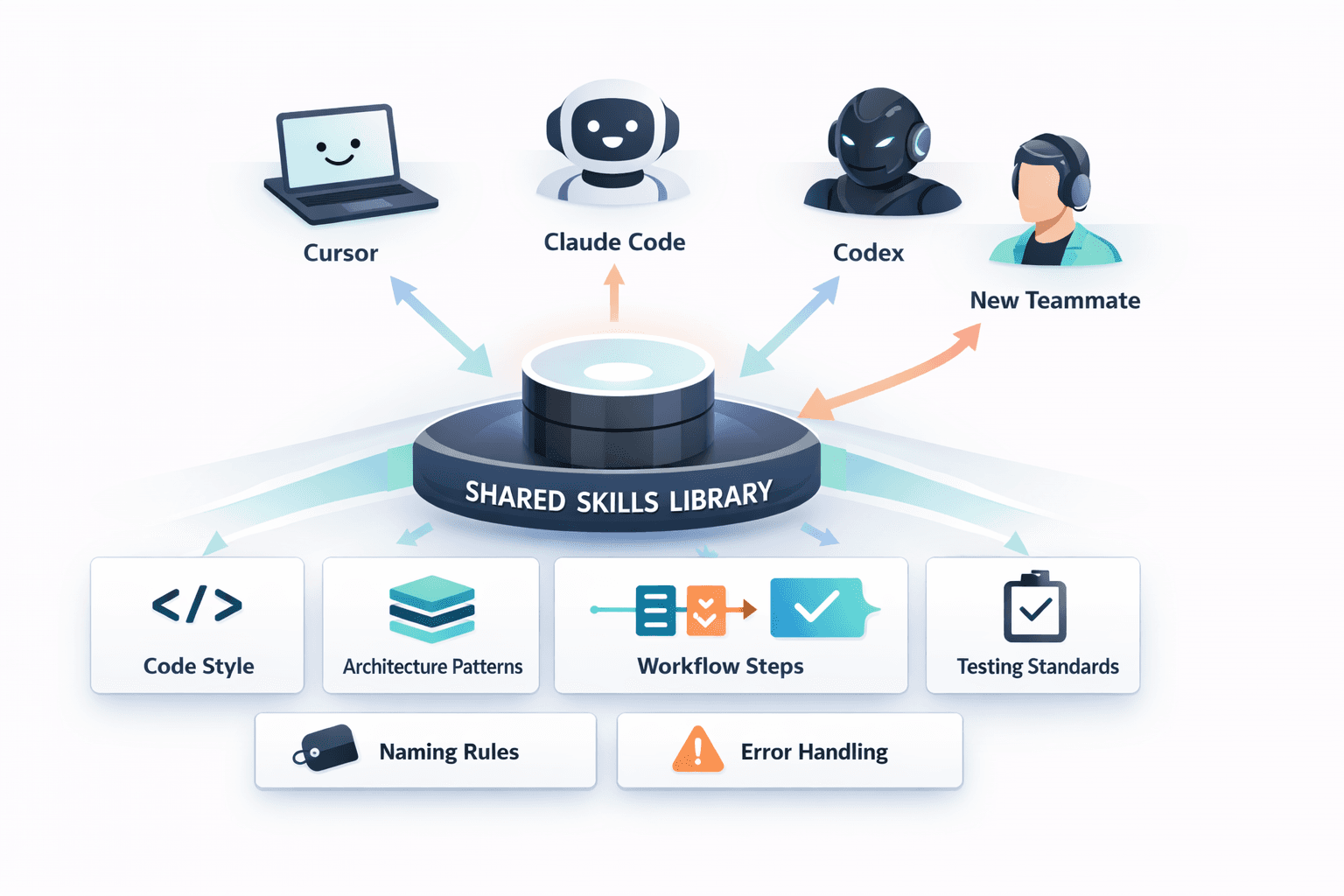
A good skill can encode the project rules your agent keeps forgetting: code style, architecture boundaries, package manager preferences, test expectations, naming conventions, error-handling patterns, review checklists, and even the order of operations for how your team actually works.
When skills are delivered through MCP, the agent can resolve the right skill at runtime instead of relying on whatever happened to be pasted into a chat. That is the real shift. The memory stops living inside a fragile conversation and starts living in a reusable system.
- A skill can define code style and formatting expectations.
- A skill can encode architecture patterns and file boundaries.
- A skill can capture workflow conventions such as testing, review steps, and tool preferences.
- A skill can standardize failure handling so the agent knows what to do when a command, build, or migration goes wrong.
How Hosted MCP Skills Solve the Forgetting Problem
This is where the fix becomes practical. Hosted MCP skills move your agent's working memory out of local files and chat history and into a shared registry. The skill does not live in one repo. It does not live on one laptop. It does not depend on one person's handcrafted system prompt.
Instead, every agent connects to the same hosted MCP server. Cursor, Claude Code, Codex, and other compatible clients all resolve from the same source of truth. When a new session starts, the agent can fetch the relevant skill for the task instead of waiting for you to reconstruct the project from memory again.
That makes the behavior portable. A new teammate joins and connects the same MCP server. They immediately get the same conventions. You switch from Cursor to Claude Code mid-project. The skill layer stays the same. You update the skill once in the registry, and every connected agent gets the new version without a file-sync scavenger hunt.
If you want the protocol-level explanation, what MCP skills are covers the concept, and the MCP docs show how the delivery path works in practice.
A concrete example makes this obvious. Say your team has a skill called react-component-conventions. It encodes your preferred prop typing, folder layout, test placement, naming rules, and the design-system patterns you expect. Every time any agent on your team starts working on a React component - in any project, in any supported tool - it can resolve and apply that skill automatically. That is the missing persistence developers keep trying to fake with reusable agent prompts and repo notes.
What This Looks Like in Practice with Milkey
Milkey is the hosted platform layer for this. You store, manage, and version your skills registry in one place, then connect your agents to the hosted MCP server instead of scattering instructions across repos and laptops.
That means the setup point moves from per-chat and per-repo to per-agent connection. Cursor, Claude Code, and Codex connect once through remote MCP config, and skills are resolved at runtime when the task calls for them. No local skill files. No copying prompt packs between machines. No separate setup ritual every time a new project starts.
It also does not force you to rewire the rest of your stack. You can keep using OpenAI, Anthropic, or Gemini as your underlying provider while Milkey handles the reusable skills layer on top. And if you are building product workflows, the same registry is available through the SDK so your app and your coding agents can use the same operating patterns instead of diverging.
If you want to see the library model behind it, the AI agent skills library guide is worth reading. If you want the installation path, jump straight to the setup guide. If you are evaluating how this fits commercially, pricing is there too.
- 1.Create your skills in the Milkey dashboard.
- 2.Connect your agent through the hosted MCP server using the installation guide.
- 3.Let the agent resolve the right skill automatically when a session starts or a task needs it.
This is what replaces the context.md file, the pasted system prompts, and the inconsistent behavior across tools.
The Team Multiplier - When Skills Stop Being Personal
The real payoff shows up when skills stop being one developer's private workaround and become team infrastructure. One person writes or improves a skill, and everyone else benefits immediately.
That changes documentation too. Skills become living instructions the agent actually reads and uses. That is much more valuable than a wiki page people vaguely remember exists but never open during real work.
When a convention changes, you update one skill in Milkey and move on. No stale copies. No mystery prompt files. No debate over whether the README, the Notion page, or the senior engineer's local setup is the real source of truth.
- One skills setup can standardize behavior across the whole team.
- New developers connect the MCP server and their agent already knows the house rules before the first PR.
- Convention changes roll out by updating one shared skill instead of chasing stale docs and local files.
Your Agent Isn't Broken. It's Stateless.
The forgetting is not a weird edge case. It is the default. If your agent feels smart in one session and clueless in the next, that is what stateless systems do when there is no persistent skills layer holding the work together.
Skills are how you change that default. They give your agent something durable to fetch, something shared to follow, and something your team can improve over time instead of retyping forever.
If your agent is starting from scratch every session, it is not working the way it could. Start free - no credit card required. Or, if you want to inspect the wiring first, read the setup guide.
Key Takeaways
- The AI coding agent context problem is structural: your agent is stateless unless you give it a reusable knowledge layer.
- Common workarounds fail because they depend on temporary chat context, stale repo files, or tool-specific prompts.
- AI agent skills turn project conventions into reusable instructions that survive across sessions and tools.
- Hosted MCP skills make those conventions shared, updateable, and consistent for teams instead of personal hacks.
FAQ
Is this really not a bug in Cursor or Claude Code?
Usually no. Specific products can have memory features or UX differences, but the core issue is that LLM agents do not automatically carry durable project knowledge between sessions unless a separate system provides it.
Do AI agent skills replace prompts completely?
No. Prompts still matter for the task you are asking for right now. Skills handle the reusable operating rules so you do not have to restate them every time.
Why are hosted MCP skills better than a local prompt file?
Because the hosted model gives every connected agent the same versioned skill from the same registry. Local files drift between machines, repos, and teammates much more easily.
Do I need to change model providers to use Milkey?
No. Milkey sits at the skills layer, so you can keep your existing provider stack while using hosted skills delivery across coding agents and apps.
Give your agent something consistent to remember
Connect Milkey once, resolve reusable skills at runtime, and stop rebuilding context from scratch in every session.
Start free - no credit card requiredRelated Reading
Continue through our content cluster with related posts and guides.
What are AI agent skills?
Start with the core concept behind reusable agent behavior.
Why AI agent skills are required
Read the broader case for adding a reusable operating layer to AI workflows.
AI agent skills library
See why a shared registry matters once skills stop being personal notes.
What are MCP skills?
Understand the runtime delivery model behind hosted skill resolution.
Milkey installation guide
Connect your agent to the hosted MCP server and verify the setup.
Milkey MCP docs
Review the protocol and tool-level docs for hosted MCP access.
Milkey dashboard
Create and manage skills in one hosted registry.
Milkey pricing
See the plans if you are evaluating rollout beyond personal use.